scipy.special.eval_jacobi#
- scipy.special.eval_jacobi(n, alpha, beta, x, out=None) = <ufunc 'eval_jacobi'>#
Evaluate Jacobi polynomial at a point.
The Jacobi polynomials can be defined via the Gauss hypergeometric function \({}_2F_1\) as
\[P_n^{(\alpha, \beta)}(x) = \frac{(\alpha + 1)_n}{\Gamma(n + 1)} {}_2F_1(-n, 1 + \alpha + \beta + n; \alpha + 1; (1 - x)/2)\]where \((\cdot)_n\) is the Pochhammer symbol; see
poch. When \(n\) is an integer the result is a polynomial of degree \(n\). See 22.5.42 in [AS] or [DLMF] for details.- Parameters:
- narray_like
Degree of the polynomial. If not an integer the result is determined via the relation to the Gauss hypergeometric function.
- alphaarray_like
Parameter.
- betaarray_like
Parameter.
- xarray_like
Points at which to evaluate the polynomial.
- outndarray, optional
Optional output array for the function values.
- Returns:
- Pscalar or ndarray
Values of the Jacobi polynomial.
See also
roots_jacobiroots and quadrature weights of Jacobi polynomials
jacobiJacobi polynomial object
hyp2f1Gauss hypergeometric function
References
[AS]Milton Abramowitz and Irene A. Stegun, eds. Handbook of Mathematical Functions with Formulas, Graphs, and Mathematical Tables. New York: Dover, 1972.
[DLMF]NIST Digital Library of Mathematical Functions, https://dlmf.nist.gov/18.5.E7
Examples
>>> import numpy as np
>>> from scipy.special import eval_jacobi
>>> import matplotlib.pyplot as plt
These are the parameter values that we’ll use in this example.
>>> alpha = 1.0
>>> beta = 0.5
Evaluate the order 3 polynomial at a few values of x.
>>> eval_jacobi(3, alpha, beta, [0, 0.25, 0.5])
array([-0.2109375 , -0.67687988, -0.47949219])
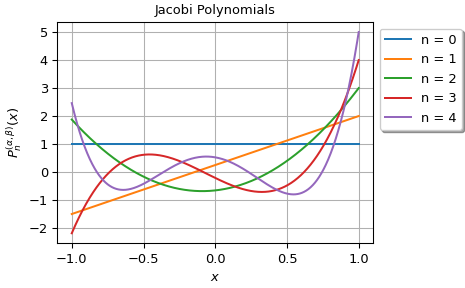
Plot the polynomials of order 0 through 4.
>>> x = np.linspace(-1, 1, 800)
>>> fig, ax = plt.subplots(1, 1, constrained_layout=True)
>>> for n in range(5):
...     y = eval_jacobi(n, alpha, beta, x)
...     ax.plot(x, y, label=f'{n = }')
>>> ax.grid()
>>> ax.set_title("Jacobi Polynomials")
>>> ax.set_xlabel("$x$")
>>> ax.set_ylabel(r"$P_n^{(\alpha, \beta)}(x)$")
>>> ax.legend(loc='upper left', bbox_to_anchor=(1, 1), shadow=True)
>>> plt.show()